



A good construction estimate is a clear chain of numbers: quantities, unit costs, line totals, trade totals, then contingency, markup and tax. Build it in that order in Excel and every figure can be traced back to its source.
Updated November 2026
The structure of an estimate
A construction estimate starts with quantities and ends with a price. Between them are unit costs, labor, equipment, contingency, overhead and profit, and tax. Keeping each step separate is what makes an estimate easy to defend and easy to update. The construction estimate template for Excel follows this structure, and this guide shows how each number is built.
Step 1: Take off the quantities
Measure from the plans and list each item with a quantity and a unit: square feet of slab, linear feet of wall framing, each for windows. Group items by trade so you can see where the money goes. Use a drop-down for units and trades so names stay the same. Microsoft explains data validation if you need the steps.
Step 2: Price material, labor and equipment per line
For every line, enter the material cost per unit, the labor hours per unit, the labor rate and the equipment cost per unit. The line formulas, with quantity in D and unit inputs in F to I:
- Material:
=D5*F5 - Labor:
=D5*G5*H5 - Equipment:
=D5*I5 - Line total:
=J5+K5+L5
Example, using made-up prices: 14 roof trusses at $185 each in material, 1.5 labor hours each at $52 an hour, and $28 of equipment each. Material is 14 x 185 = $2,590.00. Labor is 14 x 1.5 x 52 = $1,092.00. Equipment is 14 x 28 = $392.00. The line total is $4,074.00.
Step 3: Total by trade
SUMIF adds every line for a trade. With trades in Takeoff column B and material totals in column J:
=SUMIF(Takeoff!$B$5:$B$104,$A26,Takeoff!J$5:J$104)
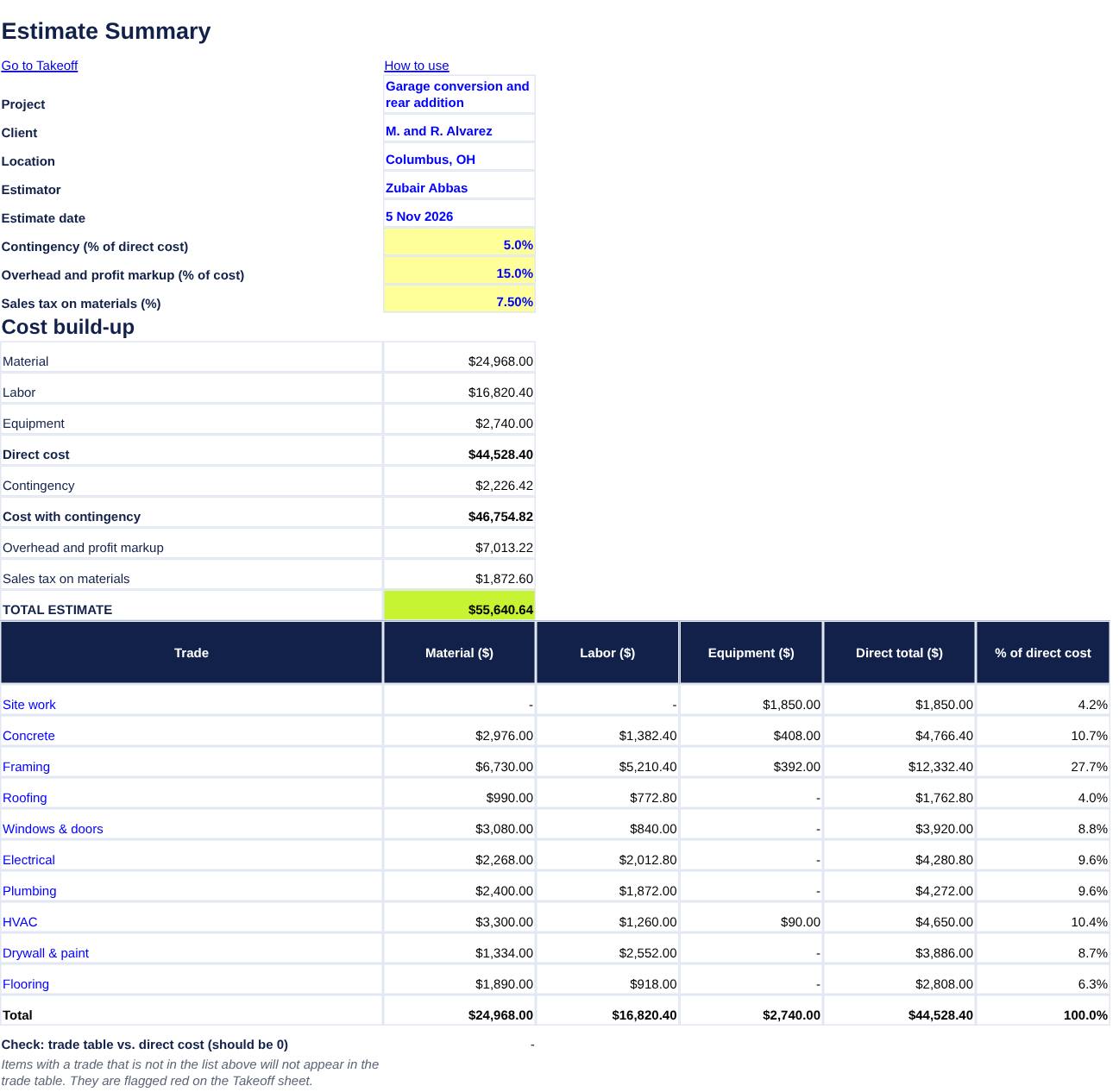
The SUMIF function is documented by Microsoft. Copy the formula across for labor (column K) and equipment (column L). Here are the trade totals for a 15-line sample estimate with invented prices:
| Trade | Material | Labor | Equipment | Direct total |
|---|---|---|---|---|
| Site work | $0.00 | $0.00 | $1,850.00 | $1,850.00 |
| Concrete | $2,976.00 | $1,382.40 | $408.00 | $4,766.40 |
| Framing | $6,730.00 | $5,210.40 | $392.00 | $12,332.40 |
| Roofing | $990.00 | $772.80 | $0.00 | $1,762.80 |
| Windows & doors | $3,080.00 | $840.00 | $0.00 | $3,920.00 |
| Electrical | $2,268.00 | $2,012.80 | $0.00 | $4,280.80 |
| Plumbing | $2,400.00 | $1,872.00 | $0.00 | $4,272.00 |
| HVAC | $3,300.00 | $1,260.00 | $90.00 | $4,650.00 |
| Drywall & paint | $1,334.00 | $2,552.00 | $0.00 | $3,886.00 |
| Flooring | $1,890.00 | $918.00 | $0.00 | $2,808.00 |
| Total | $24,968.00 | $16,820.40 | $2,740.00 | $44,528.40 |
Add a check cell, =ROUND(E36-B18,2), that compares the trade table with the direct cost. It should be 0. If not, a line has a trade that is not on the list.
Step 4: Add contingency, markup and tax
Contingency covers the unknowns, and markup covers overhead and profit. The order matters. This example applies 5 percent contingency to direct cost, 15 percent markup to the cost with contingency, and 7.5 percent sales tax to materials only. Those rates are illustrations. Set your own, and confirm how your state taxes construction materials and labor.
| Material | $24,968.00 |
| Labor | $16,820.40 |
| Equipment | $2,740.00 |
| Direct cost | $44,528.40 |
| Contingency (5%) | $2,226.42 |
| Cost with contingency | $46,754.82 |
| Overhead and profit markup (15%) | $7,013.22 |
| Sales tax on materials (7.5%) | $1,872.60 |
| Total estimate | $55,640.64 |
The formulas are: contingency =ROUND(B18*B10,2), markup =ROUND(B20*B11,2), tax =ROUND(B15*B12,2) and total =B20+B21+B22. In this example the markup is $7,013.22 on a total of $55,640.64, so markup is 12.6 percent of the final price, which is lower than the 15 percent applied to cost. That gap is the difference between markup and margin, covered in contractor markup vs margin.
Step 5: Review before you send it
Check the biggest lines first, since a pricing error on a large item matters most. Compare your total with a similar job you have done. Note exclusions and allowances in writing, and give the estimate an expiry date because material prices change. For smaller jobs, an estimate template may be enough.
Frequently asked questions
What is a quantity takeoff?
A takeoff is the list of quantities measured from plans, such as square feet of drywall or the number of windows. Costs are then applied to each quantity.
How much contingency should I add?
It depends on how complete the plans are and how risky the work is. The template treats it as an input, so set it from your own experience.
What is the difference between markup and margin?
Markup is a percent added to cost. Margin is the percent of the selling price that is profit. A 15 percent markup is a lower margin than 15 percent.
Should labor include burden?
Many contractors use a loaded labor rate that includes payroll taxes and insurance. Enter the rate you actually pay per hour, including burden if you use it.