


A lead tracker is a simple Excel sheet that answers one question every morning: who do I need to contact today? This free template gives you one row per lead, a status drop-down, an automatic follow-up date and a summary sheet that counts your pipeline for you. It works for real estate agents, contractors, freelancers and any small business that wins work by following up.
Download the free Excel Lead Tracker (.xlsx)
No sign-up. Works in Excel 2010 and later, and in Google Sheets (File, Import). The 12 rows shown are sample data: delete them and type your own.
What is inside
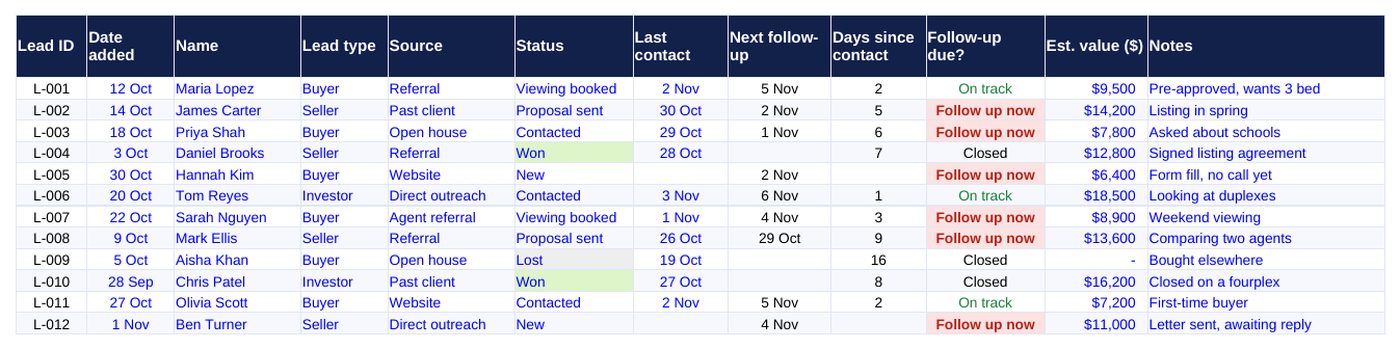
- Leads sheet: lead ID, date added, name, lead type, source, status, last contact, next follow-up, days since contact, a follow-up flag, estimated value and notes.
- Status and source drop-downs: pick from a list so your counts stay clean.
- Follow-up flag: rows turn red and say “Follow up now” when the next follow-up date has passed.
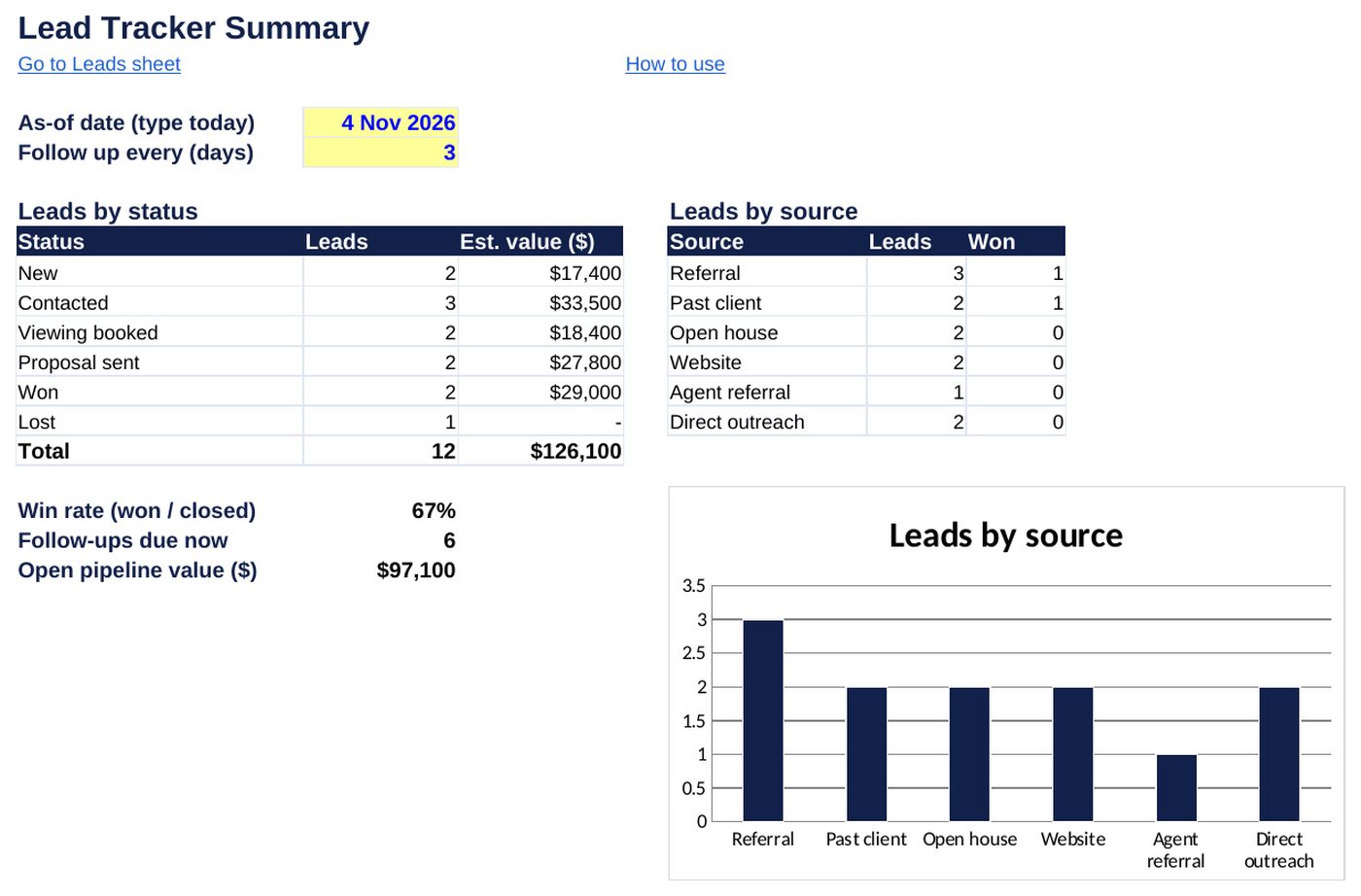
- Summary sheet: leads and value by status, leads by source, win rate, follow-ups due and open pipeline value, with a chart.
- How to use sheet: a short guide inside the file.
How to use it in five steps
- Open the file and go to the Leads sheet. Delete the sample rows.
- Add one row per lead. Choose the source and status from the drop-downs.
- After every call, email or text, type the date in Last contact.
- On the Summary sheet, set today’s date and how many days you wait between follow-ups (the yellow cells).
- Start each day with the rows that say Follow up now.
How the follow-up date works
The next follow-up is the last contact date plus your follow-up gap. If you have never contacted a lead, it uses the date you added them. Won and Lost leads show Closed and stop appearing as overdue.
| Column | Formula idea |
|---|---|
| Next follow-up | Last contact + follow-up gap (days) |
| Days since contact | As-of date minus last contact |
| Follow-up due? | Follow up now when the next follow-up date is on or before the as-of date |
| Win rate | Won divided by (Won + Lost) |
Questions
Does it work in Google Sheets?
Yes. Upload the file to Google Drive or use File, Import in Google Sheets. The drop-downs and formulas carry over.
How many leads can it hold?
The formulas and summary cover rows 2 to 200. To track more, copy the last row down and extend the ranges.
Can I change the statuses?
Yes. Edit the list in the data validation rule for the Status column, then update the labels on the Summary sheet to match.
Where do I find leads to track?
See our guides on real estate leads without ads and finding decision makers’ email addresses.
Need a tracker built around your own process, with automation or a dashboard? Contact us for a custom Excel build.