



CONCATENATE in Excel: Join Text With &, CONCAT and TEXTJOIN
Concatenate means joining text from several cells into one. Excel gives you four ways. Here is when to use each.
The four ways to join text
| Method | Example | Result when A2 is Ann and B2 is Lee |
|---|---|---|
| & operator | =A2&" "&B2 | Ann Lee |
| CONCATENATE (old) | =CONCATENATE(A2," ",B2) | Ann Lee |
| CONCAT (newer) | =CONCAT(A2," ",B2) | Ann Lee |
| TEXTJOIN | =TEXTJOIN(" ",TRUE,A2:B2) | Ann Lee |
The & operator is the shortest and works in every version. CONCAT replaces CONCATENATE and accepts ranges. TEXTJOIN adds a separator and can skip blank cells.
Join with a separator and skip blanks
With Ann in A2, Lee in B2 and C2 empty, =TEXTJOIN(", ",TRUE,A2:C2) returns Ann, Lee. The TRUE means “ignore empty cells”, so you do not get a stray comma.
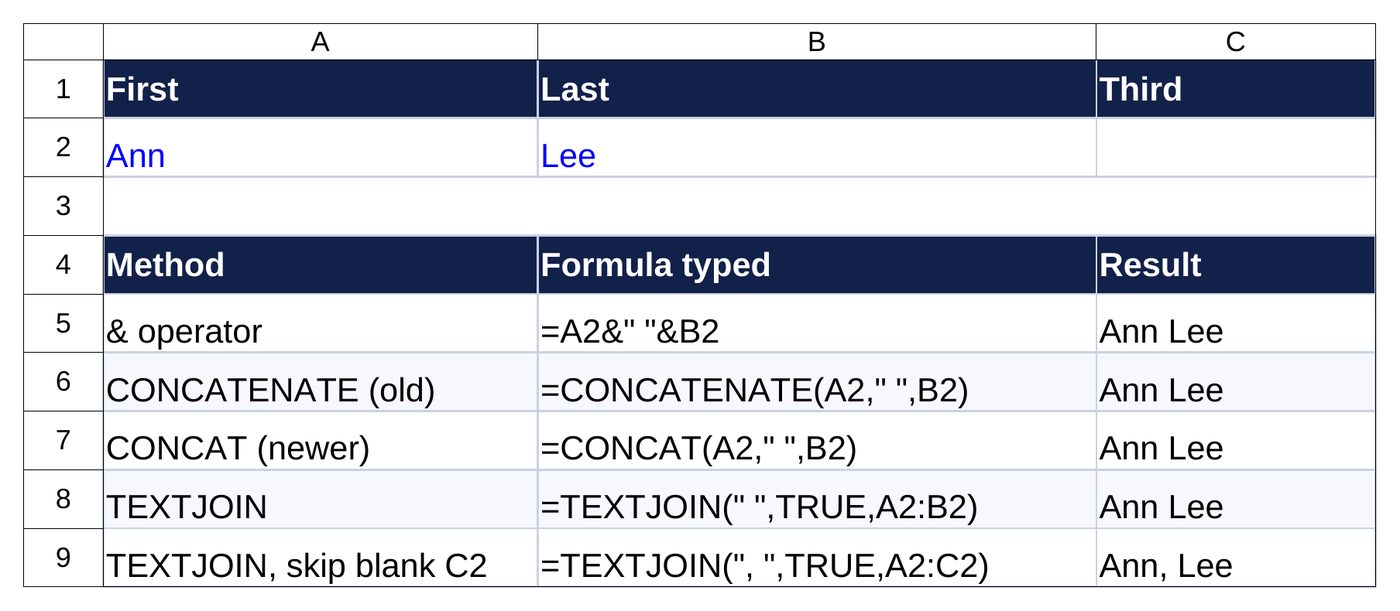
=A2&" "&B2 returns Ann Lee and =TEXTJOIN(", ",TRUE,A2:C2) returns Ann, Lee.Join text with numbers and dates
Numbers lose their format when joined. Wrap them in TEXT:
| Formula | Result (A2 = Ann, B2 = 1234.5) |
|---|---|
=A2&" paid "&TEXT(B2,"$#,##0.00") | Ann paid $1,234.50 |
="Due "&TEXT(DATE(2027,3,15),"mmm d, yyyy") | Due Mar 15, 2027 |
Common uses
- Full name from first and last name.
- Address lines from street, city and ZIP.
- Email addresses from a name and domain:
=LOWER(A2&"."&B2&"@example.com") - Product codes such as SKU-001 using a prefix and TEXT(number,”000″).
Reverse it: split text
To split a full name into columns, use Data > Text to Columns, or TEXTSPLIT in Microsoft 365. Need to pull emails out of messy text? Try the email extractor.
Free pricing tips for your business
Get short, practical tips on pricing jobs and using our free calculators. No spam, unsubscribe any time.
Frequently asked questions
Is CONCATENATE still supported?
Yes, for compatibility, but Microsoft recommends CONCAT. The & operator works everywhere.
How do I add a space between cells?
Add ” ” as its own argument: =A2&” “&B2.
How do I join a whole column into one cell?
Use =TEXTJOIN(“, “,TRUE,A2:A100).
Why does my date turn into a number?
Dates are stored as serial numbers. Use TEXT(A2,”mm/dd/yyyy”) inside the join.
Need a custom Excel sheet or automation?
Talk to usMore free tools: All free tools · Email extractor · VLOOKUP guide · Free Excel templates