


IF Formula in Excel: Simple, Nested and AND/OR Examples
The IF function lets Excel make a decision: show one result when a test is true and another when it is false. These examples build from simple to nested.
The data used in the examples
| A: Region | B: Rep | C: Amount | |
|---|---|---|---|
| 1 | Region | Rep | Amount |
| 2 | East | Ann | 1200 |
| 3 | West | Bob | 800 |
| 4 | East | Cara | 450 |
| 5 | North | Ann | 950 |
| 6 | West | Dan | 600 |
| 7 | East | Bob | 300 |
IF syntax
=IF(logical_test, value_if_true, value_if_false)
Example in D2: =IF(C2>=500,"High","Low") returns High for 1,200 and Low for 450.
Nested IF: more than two outcomes
=IF(C2>=1000,"Gold",IF(C2>=500,"Silver","Bronze"))
| Row | Amount | Result |
|---|---|---|
| 2 | 1,200 | Gold |
| 3 | 800 | Silver |
| 4 | 450 | Bronze |
| 5 | 950 | Silver |
| 6 | 600 | Silver |
| 7 | 300 | Bronze |
Excel checks the tests in order, so put the highest threshold first. For many levels, a lookup table with XLOOKUP is easier to maintain than a long nest.
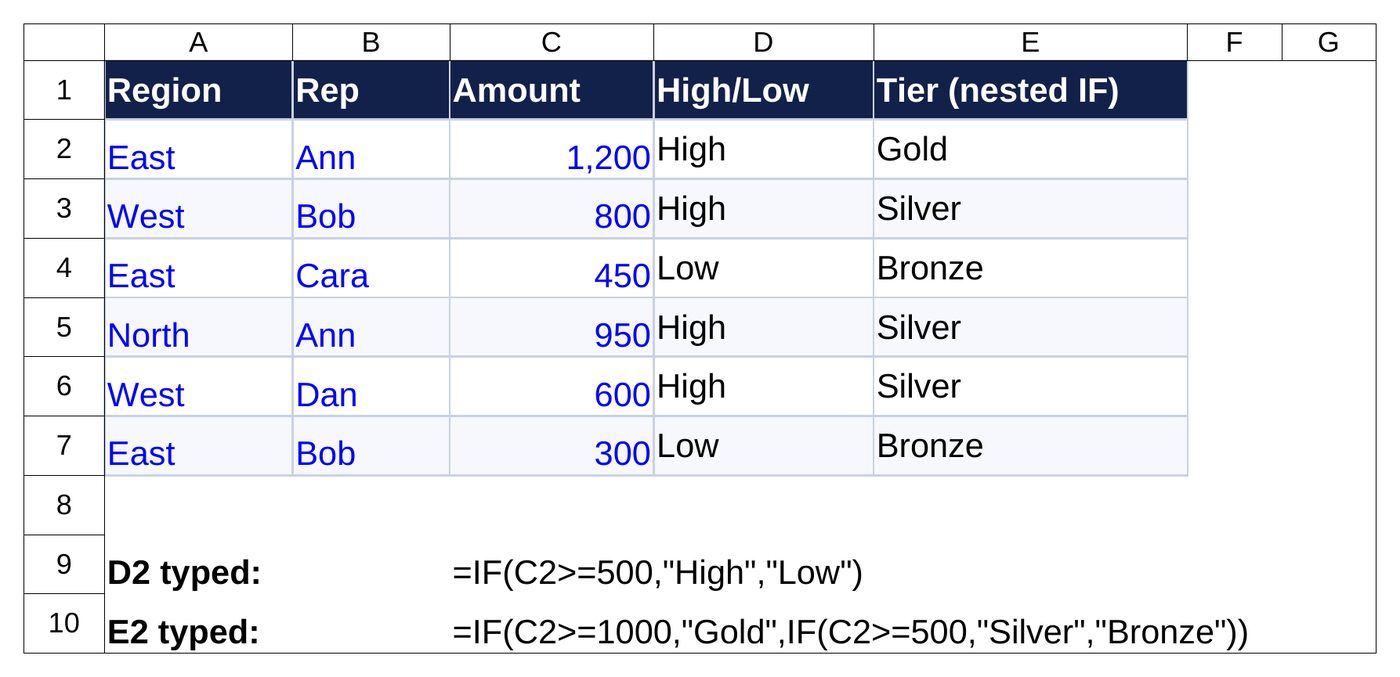
=IF(C2>=1000,"Gold",IF(C2>=500,"Silver","Bronze")) returns Gold for 1,200, Silver for 800 and Bronze for 450.IF with AND and OR
- Both must be true:
=IF(AND(A2="East",C2>500),"Bonus",""). In row 2 it returns Bonus; in row 4 (East, 450) it returns blank. - Either can be true:
=IF(OR(A2="East",A2="West"),"Covered","Other")
IF with a blank check and errors
- Skip empty rows:
=IF(C2="","",C2*1.1) - Hide errors:
=IFERROR(B2/C2,"")
Common mistakes
- Text results need quotes: “High”, not High.
- Every opening bracket needs a closing one. Excel colours matching pairs as you type.
- Do not compare text with a number: “500” and 500 are different.
To count or sum by the same tests, see COUNTIF and SUMIF.
Free pricing tips for your business
Get short, practical tips on pricing jobs and using our free calculators. No spam, unsubscribe any time.
Frequently asked questions
How many IFs can I nest?
Modern Excel allows 64 levels, but more than three or four is hard to read. Use IFS, SWITCH or a lookup table instead.
What is the difference between IF and IFS?
IFS (Excel 2019 and Microsoft 365) tests several conditions without nesting. IF is available in every version.
Can IF return a number and text?
Yes, but keep one type per column so later formulas work.
How do I make IF case sensitive?
Wrap the comparison in EXACT, for example =IF(EXACT(A2,”East”),1,0).
Need a custom Excel sheet or automation?
Talk to usMore free tools: All free tools · XLOOKUP · COUNTIF · Conditional formatting