



Payroll comes down to one chain: hours or salary become gross pay, deductions come off, and what is left is net pay. Excel can do that arithmetic for a small team if you keep the tax percentages as inputs. Here is how to set it up.
Updated November 2026
What payroll needs to calculate
For each pay period, payroll works out gross pay, subtracts withholding and deductions, and arrives at net pay. Excel can handle that arithmetic cleanly if you keep inputs, such as rates and percentages, separate from formulas. The payroll calculator Excel template is laid out this way. Tax figures are user inputs here: this guide does not set withholding amounts, and the IRS and your state decide what applies to you. The IRS explains employer duties in Publication 15 (Circular E), Employer’s Tax Guide, and gives an overview on its employment taxes page.
Step 1: Set up the inputs
Put these in one place: pay frequency, pay periods per year, overtime multiplier, and the Social Security and Medicare rates. Pay periods per year follow from the frequency: =IF(B8="Weekly",52,IF(B8="Bi-weekly",26,IF(B8="Semi-monthly",24,12))). The IRS lists the current employee rates as 6.2 percent for Social Security and 1.45 percent for Medicare, with a matching amount paid by the employer, on its Topic 751 page. That page also gives the Social Security wage base for 2026 as $184,500, above which the Social Security tax stops for the year. A simple register ignores the limit, so watch for high earners.
Step 2: Create an employee list
One row per employee: ID, name, pay type, hourly rate or annual salary, federal withholding percent, state withholding percent and other deductions per period. Use a drop-down for pay type. Look up details from the register with INDEX and MATCH, so each employee is stored once.
Step 3: Calculate gross pay
For an hourly employee, regular pay is hours times rate and overtime is overtime hours times rate times the multiplier. In the register, with regular hours in E, overtime hours in F and the rate in D:
- Regular pay:
=ROUND(E6*D6,2) - Overtime pay:
=ROUND(F6*D6*Settings!$B$10,2) - Salary pay:
=ROUND(annual_salary/Settings!$B$9,2) - Gross pay:
=G6+H6
Whether overtime applies, and at what multiplier, depends on the worker and the law that covers them. The multiplier is an input, so set it to what applies to you. See our guide on how to calculate overtime pay.
Step 4: Apply withholding and deductions
Each withholding line is gross pay times a percentage, rounded to cents: =ROUND(I6*fed_percent,2) and the same for state, Social Security and Medicare. Add any other deduction per period. Total deductions is =SUM(J6:N6), and net pay is =I6-O6.
Worked example
Ava Martinez is hourly at $22.50 and worked 80 regular hours and 6 overtime hours in a bi-weekly period. The percentages below are invented for illustration, not recommendations.
| Regular pay: 80 x $22.50 | $1,800.00 |
| Overtime pay: 6 x $22.50 x 1.5 | $202.50 |
| Gross pay | $2,002.50 |
| Federal withholding (10%) | $200.25 |
| State withholding (3%) | $60.08 |
| Social Security (6.2%) | $124.16 |
| Medicare (1.45%) | $29.04 |
| Other deduction | $35.00 |
| Total deductions | $448.53 |
| Net pay | $1,553.97 |
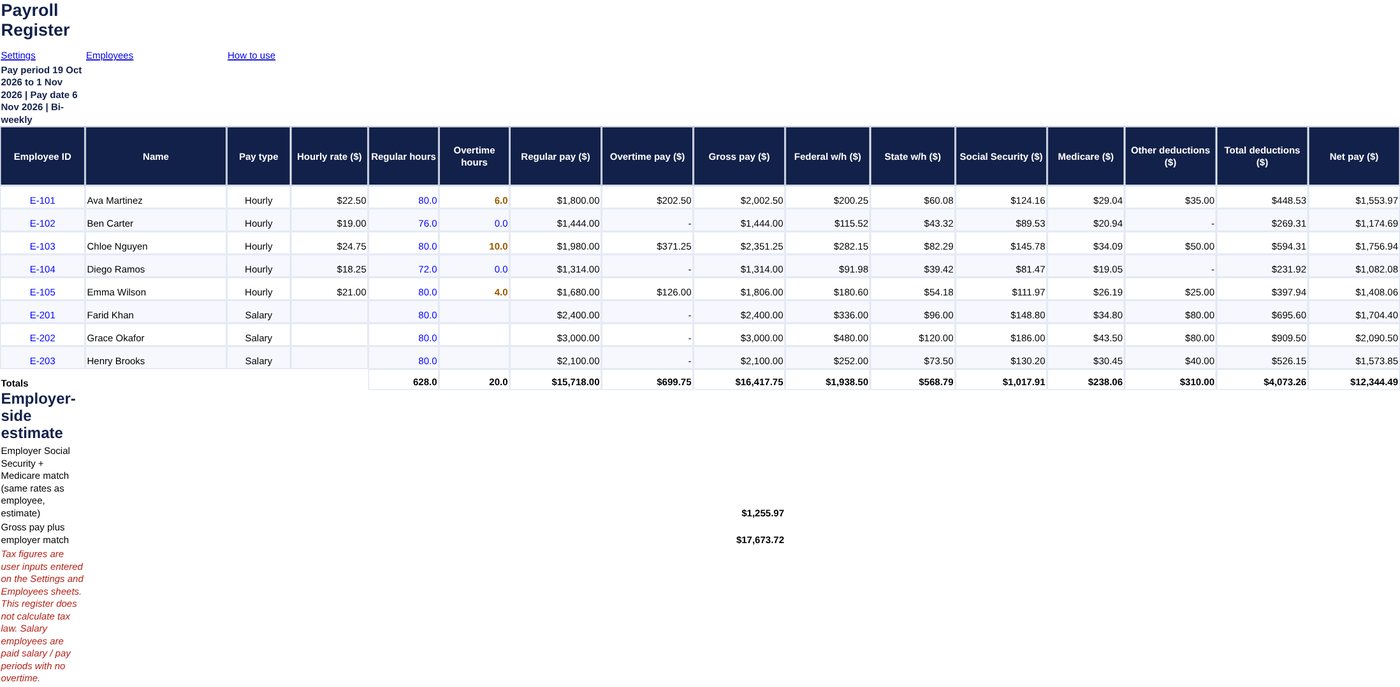
For a salaried employee, Farid Khan earns $62,400 a year. With 26 pay periods, regular pay is 62,400 / 26 = $2,400.00 and there is no overtime. Across all eight sample employees, gross pay is $16,417.75 and net pay is $12,344.49. The employer-side Social Security and Medicare match at the same rates comes to $1,255.97. The totals come from sample data and made-up percentages.
Step 5: Build the register and check it
A payroll register is one row per employee for the period, with totals at the bottom. Check that gross pay minus total deductions equals net pay on the totals row, and that hours match your timesheets. Collect hours with a timesheet template. Keep the register for your records, and rely on payroll software or a professional to file, pay taxes and prepare year-end forms. For quick overtime checks, use the overtime calculator.
This guide is educational and is not tax or legal advice.
Frequently asked questions
How do I calculate gross pay in Excel?
For hourly staff multiply regular hours by the rate, then add overtime hours times the rate times the overtime multiplier. For salaried staff divide the annual salary by pay periods.
Where do withholding percentages come from?
They depend on each employee’s tax forms, filing status and your state. This guide uses simple percentages as inputs. See IRS Publication 15 for the federal method.
What are the Social Security and Medicare rates?
The IRS lists the employee rates as 6.2 percent for Social Security and 1.45 percent for Medicare, with the employer paying a matching amount. Check the IRS page for the current rules and wage base.
Should I use Excel for payroll?
It works for a few employees when you need a calculator and a record. Filing, payments and year-end forms still need payroll software or a professional.