



A marketing plan does not need to be long. It needs goals with numbers, a budget by channel, a calendar of what happens when and a short list of KPIs. This guide walks through each part and shows the Excel formulas that keep the budget and results honest.
Updated November 2026
Start with the goal, not the channel
A marketing plan connects what the business wants to what you will do and spend. Begin with two or three goals that have a number and a date, for example “raise qualified leads from 40 to 90 a month by December”. Goals without numbers cannot be checked. The SBA publishes a marketing plan example that shows the usual sections, and the marketing plan template for Excel turns those sections into linked sheets.
Step 1: Describe your audience and position
Write one sentence on who you serve and one on why they should pick you. “Homeowners within 25 miles who need regular maintenance” and “upfront-priced repairs with same-week scheduling” are specific enough to guide choices. They also tell you which channels to rule out.
Step 2: Set goals with a baseline and target
For each goal, record where you are now (baseline), where you want to be (target) and where you are today (current). Progress is the share of the gap already closed:
=IF(E10=D10,"",(F10-D10)/(E10-D10))
With D as baseline, E as target and F as current. Because both the top and bottom flip sign when a goal goes down, the formula works for cost goals too. Two examples from a sample plan:
- Leads per month: baseline 40, target 90, current 61. Progress = (61 – 40) / (90 – 40) = 42 percent.
- Cost per lead: baseline $48, target $30, current $41. Progress = (41 – 48) / (30 – 48) = 39 percent.
Step 3: Choose channels and set a budget for each
List the channels you will use, such as SEO and content, email, paid search, paid social, events and referrals, and give each an annual budget. Keep a small “Other” line for tests. Budget by channel, not by campaign, so you can compare channels later.
Step 4: Build a monthly calendar
Put every activity on a calendar with a month, channel, owner, planned spend and status. When the money is spent, add the actual figure. Variance is actual minus planned, so a positive number means overspend: =IF(OR(E5="",F5=""),"",F5-E5).
Step 5: Compare budget with actual spend
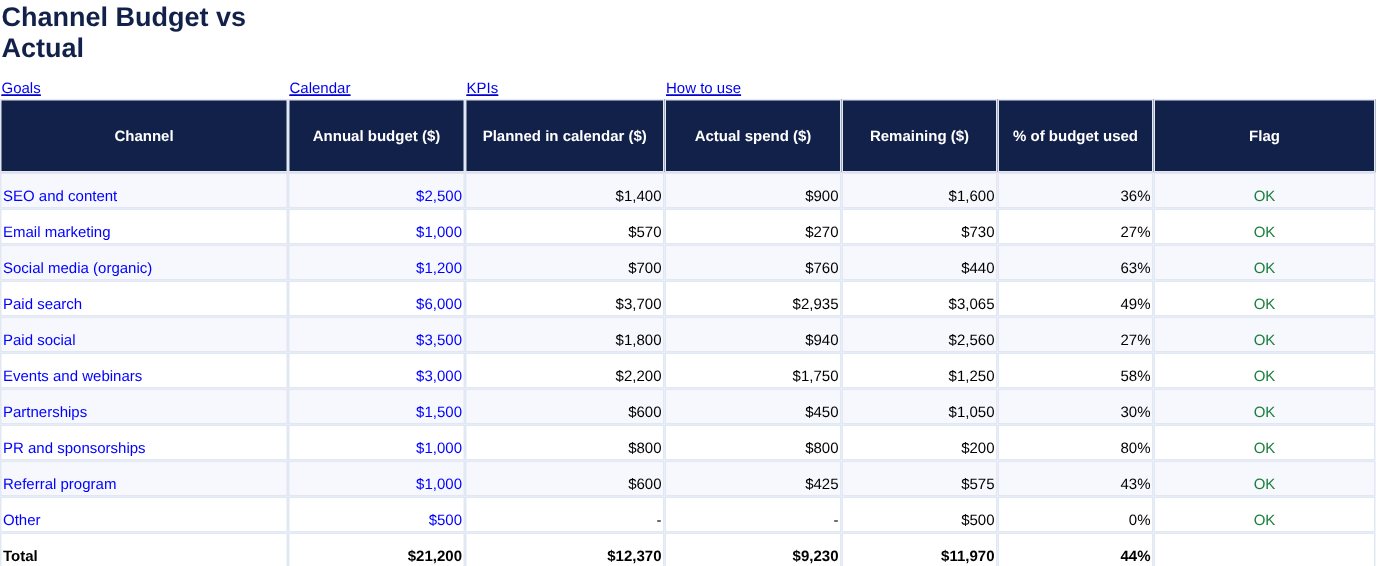
Pull the calendar totals into the budget by channel with SUMIF. If channels are in Calendar column C and actual spend in column F, then for the channel named in A5 on the Budget sheet:
=SUMIF(Calendar!$C$5:$C$64,A5,Calendar!$F$5:$F$64)
Microsoft’s page on the SUMIF function and its SUMIFS function explain the arguments. Share of budget used is =IF(B5=0,0,D5/B5). This excerpt is from the sample plan:
| Channel | Annual budget | Planned | Actual | Remaining | Used |
|---|---|---|---|---|---|
| Paid search | $6,000.00 | $3,700.00 | $2,935.00 | $3,065.00 | 49% |
| SEO and content | $2,500.00 | $1,400.00 | $900.00 | $1,600.00 | 36% |
| Email marketing | $1,000.00 | $570.00 | $270.00 | $730.00 | 27% |
Across all ten channels in the sample plan, the budget is $21,200.00, planned activities total $12,370.00 and actual spend is $9,230.00, which is 44 percent of budget. The figures are illustrations, not benchmarks.
Step 6: Track KPIs with a status
Pick six to ten numbers you can measure monthly. For KPIs where higher is better, percent of target is Actual / Target. Where lower is better, such as cost per lead, flip it to Target / Actual so that 100 percent still means success:
=IF(OR(F5="",E5=0,F5=0),"",IF(C5="Lower is better",E5/F5,F5/E5))
In the sample, a cost per lead target of $30 with an actual of $41 gives 30 / 41 = 73 percent, so it is flagged Watch. A conversion rate target of 3.0 percent with an actual of 2.4 percent gives 80 percent. A simple rule is On track at 90 percent or more, Watch from 60 to 89 percent and Behind below 60.
Review monthly
Enter actual spend and KPI results at the end of each month, then ask three questions: which channel is furthest behind, which is cheapest per lead, and what will you change next month. If you need a place for the leads themselves, use the free lead tracker template, and roll the marketing budget into a small business budget.
Frequently asked questions
What should a marketing plan include?
Goals, the target audience, your positioning, the channels you will use, a budget, a calendar of activities and the KPIs you will track.
How much should I spend on marketing?
There is no single right percentage. Start from your goals and past results, and set a budget per channel you can review monthly.
How often should I review the plan?
Update actual spend and KPIs monthly. Review goals and channel mix every quarter and adjust.
How do I know if a channel is working?
Compare its cost per lead or per customer with your target, using the KPI table. Cut or change channels that stay behind target for several months.