



An expense report is how you get paid back for business costs. A clean one gets approved in a day, and a messy one comes back with questions. Here is how to fill one out, with the Excel formulas that do the arithmetic.
Updated November 2026
What goes on an expense report
An expense report answers four questions for each cost: when, what, how much and why. Add the category and the payment method and the finance team can approve and book it quickly. Most reports share the same parts: a header with the employee, department, period and purpose; a list of receipts; mileage; totals by category; the amount owed; and an approval signature.
If you would rather not build it, the expense report template for Excel has all of this ready, including the receipt check and approval block.
Step 1: Fill in the header
Write your name, department, the dates the report covers and a one-line business purpose, such as “Chicago client workshop”. A clear purpose is what lets a manager approve without questions.
Step 2: List every expense
Enter one line per receipt with the date, a short description, the vendor and the amount. Choose a category from a fixed list and note how you paid: personal card, cash or company card. A drop-down list (see Microsoft’s guide to data validation) stops typos that would otherwise split one category into two.
Step 3: Add mileage
If you drove your own car for work, log the date, start, destination, purpose and miles for each trip. The amount is miles times the rate: =ROUND(E5*F5,2). Use the rate your employer reimburses. For tax purposes the IRS publishes standard mileage rates on its standard mileage rates page. At the time of writing it lists 76 cents per mile for business use from July 1 to December 31, 2026, and 72.5 cents for January 1 to June 30, 2026. Rates change, so confirm the current figure.
Example: a 38.4-mile trip at $0.76 is 38.4 x 0.76 = 29.184, which rounds to $29.18. The four trips in the sample total 98.6 miles and $74.93, because each line is rounded before adding.
Step 4: Total by category
A SUMIF formula adds every line with the same category. With categories in column C and amounts in column G of the Expenses sheet, and the category name in cell A17 of the summary:
=SUMIF(Expenses!$C$5:$C$44,A17,Expenses!$G$5:$G$44)
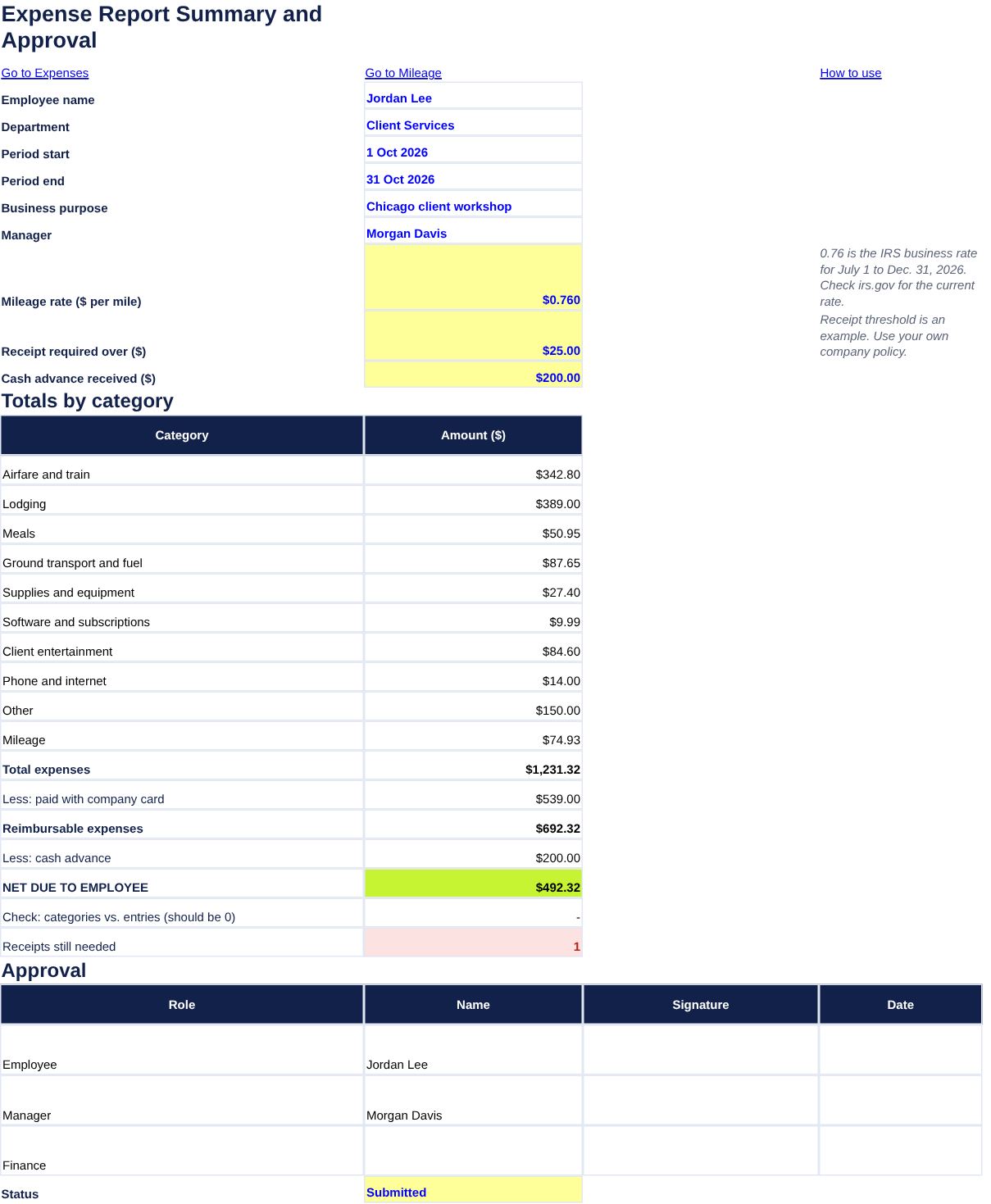
Microsoft describes the syntax in its SUMIF function page. Here is the sample report, with mileage added as its own category:
| Category | Amount |
|---|---|
| Airfare and train | $342.80 |
| Ground transport and fuel | $87.65 |
| Lodging | $389.00 |
| Meals | $50.95 |
| Client entertainment | $84.60 |
| Other | $150.00 |
| Supplies and equipment | $27.40 |
| Software and subscriptions | $9.99 |
| Phone and internet | $14.00 |
| Mileage | $74.93 |
| Total expenses | $1,231.32 |
Step 5: Work out what you are owed
Some costs were never paid by you. Subtract the ones charged to the company card, then subtract any cash advance you received:
- Paid with company card:
=SUMIF(Expenses!$E$5:$E$44,"Company card",Expenses!$G$5:$G$44)gives $539.00 - Reimbursable expenses: total minus company card = $1,231.32 – $539.00 = $692.32
- Net due to you: reimbursable minus the $200.00 advance = $492.32
If the result is negative, the advance was more than your expenses, and you owe the difference back. The totals above come from sample data, so yours will differ.
Step 6: Check receipts and get approval
Flag any line above your company’s receipt limit that has no receipt: =IF(AND(G5>25,F5<>"Yes"),"Receipt needed",""). The $25 is only an example. Then sign, date and send the report to your manager. Keep copies of your receipts. For tax deductions, the IRS explains the records you need in the recordkeeping chapter of Publication 463, Travel, Gift, and Car Expenses, and your employer’s policy may ask for more.
Tips for faster approval
Submit on a regular schedule and do not let receipts pile up. Photograph receipts the day you get them. Write a purpose on every client meal, with the names of the people there. If you track personal or small business spending as well, the expense tracker template and the mileage calculator cover those cases.
Frequently asked questions
What is an expense report?
A document in which an employee lists business costs they paid, with dates, categories and receipts, so the company can reimburse them.
How long do I have to submit one?
It depends on your employer. Many ask for a report within a few weeks of the trip or at month end, so check your policy.
Do I need every receipt?
Most companies require receipts above a set amount, and some require all of them. Keep every receipt anyway, since it is the only proof of the purchase.
What if I paid with the company card?
List it so the report is complete, but it is not reimbursed to you. In the template it is subtracted before the amount due is calculated.