



The internal rate of return answers a plain question: what yearly return does this investment earn, given when the cash goes out and when it comes back? This guide explains the idea, walks through a verified example, shows the Excel formulas and lists the situations where IRR can mislead you.
Updated November 2026
What the internal rate of return means
IRR is the discount rate at which the net present value of a project’s cash flows is exactly zero. Put another way, it is the annual return the project earns on the money invested, after accounting for when each dollar arrives. A project that returns cash early scores a higher IRR than one that returns the same total cash later.
The equation has no closed-form solution once there are more than a few periods, so IRR is found by trial and error. Spreadsheets and calculators do that iteration for you.
0 = CF0 + CF1/(1+IRR) + CF2/(1+IRR)^2 + ... + CFn/(1+IRR)^n
Worked example
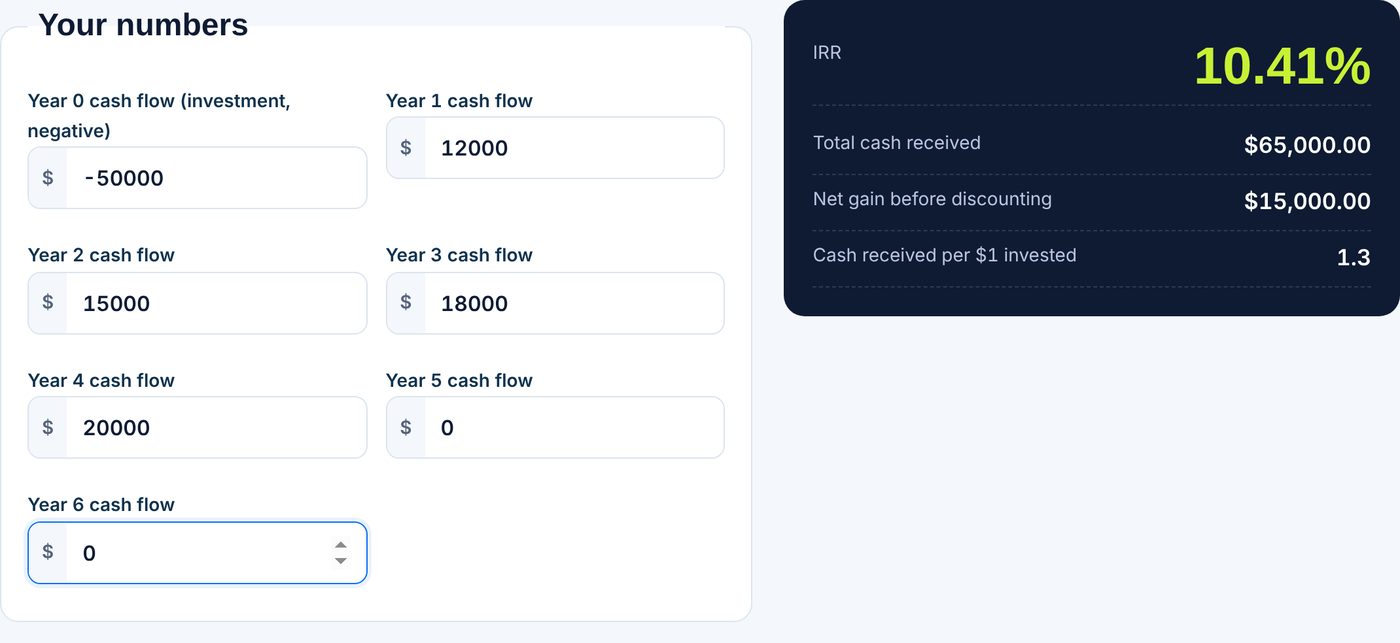
An illustrative project costs $50,000 today and is expected to return $12,000, $15,000, $18,000 and $20,000 at the end of years 1 through 4. The total return is $65,000, a profit of $15,000 before accounting for the time value of money.
To find the IRR, test discount rates until the present value of the inflows equals $50,000:
| Discount rate | NPV of the cash flows |
|---|---|
| 10% | $489.72 |
| 12% | -$1,805.40 |
| 20% | -$9,521.60 |
| 10.41% (IRR) | $0.00 |
The NPV is positive at 10 percent and negative at 12 percent, so the IRR sits between 10 and 12 percent. Narrowing the range step by step gives 10.41 percent. A bisection search does this automatically: it picks the midpoint of a low and high rate, checks the sign of the NPV, and keeps whichever half still contains the zero crossing. You can try your own cash flows in our IRR calculator.
Calculating IRR in Excel
Enter the cash flows in a column, with the investment as a negative number in the first cell. If they are in A1:A5, use =IRR(A1:A5). Microsoft notes that the values must contain at least one positive and one negative number, and that the cash flows must occur at regular intervals, as explained on its IRR function page. If your dates are irregular, use =XIRR(values, dates) instead, described on the XIRR function page. For the example above, Excel returns 10.41%.
How to read the result
Compare the IRR with the return you require, often called the hurdle rate. If the IRR is above it, the project clears the bar. If you borrow to fund the project, the IRR should also exceed your borrowing cost. The IRR does not tell you how big the profit is, so a small project with a high IRR may add less value than a large one with a modest IRR. Pair it with net present value when ranking projects.
Common problems
- No sign change. If every cash flow is positive or every one is negative, there is no IRR. A forgotten minus sign on the investment is the usual cause.
- Multiple IRRs. When cash flows change sign more than once, for example a large cleanup cost at the end, more than one rate can solve the equation. Use NPV at a chosen rate instead.
- Reinvestment assumption. IRR implicitly assumes interim cash is reinvested at the IRR itself, which may be unrealistic for very high rates.
- Uneven timing. Plain IRR assumes equal gaps between cash flows. Use XIRR for dates.
For background, see the Wikipedia article on internal rate of return. For a simpler single-period return, use the ROI calculator, and to value a business using a required rate, see the business valuation calculator. Results are estimates for general information, not investment advice.
Tips for building the cash flow list
Put every cost in the year it is paid, not when it is budgeted. Include the final sale or resale value in the last year. If the project runs fewer years than your list, fill the rest with zeros, which do not change the answer. Use net cash flows for each year, meaning inflows minus outflows, and avoid including financing payments unless you want an IRR on the equity you put in rather than on the whole project. Finally, test the sensitivity: lower each inflow by 10 percent and see how far the IRR falls. If a small miss pushes it below your hurdle rate, the project has little margin for error. As a final check, plug your IRR back into the NPV formula. If the result is close to zero, the rate is right. Keep a record of the assumptions behind each yearly figure, since the IRR is only as sound as the forecast it is built on.
Frequently asked questions
What is a good IRR?
It depends on risk and on your required return. A project is generally attractive when its IRR is above the hurdle rate or the cost of funding it.
What is the difference between IRR and NPV?
NPV gives a dollar value at a chosen discount rate. IRR gives the rate at which NPV equals zero. NPV is better for comparing projects of different sizes.
Why does Excel return #NUM! for IRR?
Usually the values lack both a positive and a negative number, or Excel could not converge on an answer. Check the signs and try supplying a guess.
Can IRR be negative?
Yes. If the total cash received is less than the amount invested, the IRR is below zero.