


There are 1,440 minutes in a day. The number comes from 24 hours in a day multiplied by 60 minutes in an hour. A day also has 86,400 seconds, since each minute has 60 seconds. Knowing these numbers helps with time tracking, billing, scheduling, study plans, cooking, programming and many everyday conversions. This page gives the minutes in a day, week, month and year, shows how to convert days to minutes and back, explains how Excel stores time as a fraction of a day, gives formulas to convert times to minutes, and ends with practical examples and practice problems. All calculations can be checked with a simple calculator.
Updated November 2026
In this guide
- Minutes in a day: the answer
- Time conversion table
- Convert days to minutes
- Convert minutes to days
- Minutes in a week, a month and a year
- How Excel stores time
- Excel formulas for minutes
- Minutes between two times
- Using the minutes of a day for planning
- Study and productivity sessions
- Billing by the minute
- Days with daylight saving time changes
- Everyday activities in minutes
- Common mistakes
- Practice problems
- Quick summary
Minutes in a day: the answer
One day has 24 hours. Each hour has 60 minutes. So one day has 24 times 60, which is 1,440 minutes. Each minute has 60 seconds, so a day has 1,440 times 60, which is 86,400 seconds. These numbers are used for a standard civil day, and they do not change from day to day, except for rare leap seconds, which are added to clocks very occasionally and are ignored in everyday calculations.
Time conversion table
This table shows the minutes in common periods.
| Period | Minutes | Seconds |
|---|---|---|
| 1 hour | 60 | 3,600 |
| 8 hours | 480 | 28,800 |
| 1 day | 1,440 | 86,400 |
| 1 week | 10,080 | 604,800 |
| 30 days | 43,200 | 2,592,000 |
| 365 days | 525,600 | 31,536,000 |
To check the week, multiply 1,440 by 7, which gives 10,080. For 30 days, multiply by 30, which gives 43,200.
Convert days to minutes
Multiply the number of days by 1,440. For 2.5 days, the result is 2.5 times 1,440, which is 3,600 minutes. For 3 days, it is 4,320 minutes. For half a day, it is 720 minutes, which is the same as 12 hours. For a part of a day, you can first convert to hours and then to minutes. For example, 1 day and 6 hours is 30 hours, and 30 times 60 is 1,800 minutes.
Convert minutes to days
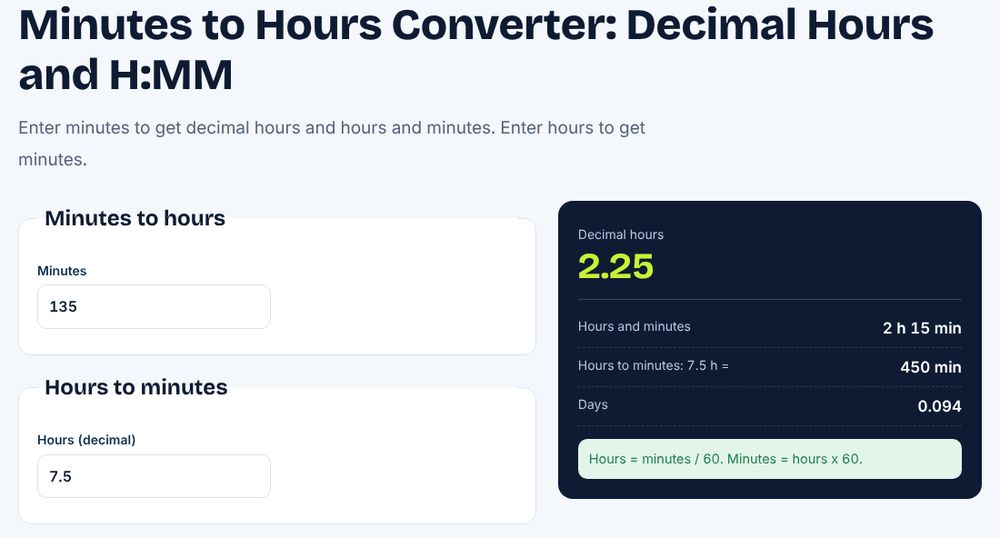
Divide the minutes by 1,440. For 5,000 minutes, the result is 5,000 divided by 1,440, which is about 3.47 days. To express the remainder in hours and minutes, take the whole days first, which are 3 days or 4,320 minutes. The remainder is 680 minutes, which is 11 hours and 20 minutes, since 11 times 60 is 660. So 5,000 minutes is 3 days, 11 hours and 20 minutes. Our minutes to hours converter gives the hours quickly.
Minutes in a week, a month and a year
A week has 7 days, so it has 7 times 1,440, which is 10,080 minutes. A 30-day month has 43,200 minutes, a 31-day month has 44,640 minutes and February with 28 days has 40,320 minutes. A normal year of 365 days has 525,600 minutes, and a leap year has 527,040. You can see more on our hours in a year page and our hours in a week page, which show the same idea in hours.
How Excel stores time
Excel stores a day as the number 1, so a time is a fraction of a day. Noon is 0.5, 6 AM is 0.25, and one hour is 1/24, which is about 0.0416667. One minute is 1/1440, which is about 0.000694444. This is why you multiply a time by 1,440 to get the minutes. If cell A1 holds 6:30 AM, which is 0.2708333, then =A1*1440 returns 390 minutes, since 6 hours is 360 minutes plus 30. Format the result as a number, not as a time, or you will see a strange value.
Excel formulas for minutes
To convert a duration in cell A1, such as 2:15 meaning 2 hours and 15 minutes, use =A1*1440, which returns 135. To convert minutes in B1 back to a time, use =B1/1440 and format the cell as [h]:mm. For 135 minutes you will see 2:15. Use HOUR(A1)*60+MINUTE(A1) as another way to get the total minutes of a time of day. For the minutes between two times, subtract the start from the end and multiply by 1,440. If the end time is the next day, add 1 to the end before you subtract.
Minutes between two times
For a shift that starts at 9:00 and ends at 17:30, the difference is 8.5 hours. In Excel, =(B1-A1)*1440 returns 510 minutes. For a night shift from 22:00 to 06:00, use =MOD(B1-A1,1)*1440. The MOD function fixes the negative result that happens when the end time is smaller than the start time. The result is 480 minutes. This is the standard approach for timesheets. Our overtime calculator uses hours and minutes in the same way.
Using the minutes of a day for planning
Looking at the day as 1,440 minutes makes planning concrete. Sleep of 8 hours takes 480 minutes, which is one third of the day. A working day of 8 hours takes another 480 minutes, so 480 minutes remain for everything else, including travel, meals and rest. If a task takes 45 minutes, you could fit about 10 of them in a working day, since 480 divided by 45 is 10.67. A planner who counts the minutes is less likely to overfill the day.
Study and productivity sessions
The Pomodoro method uses 25-minute work sessions followed by 5-minute breaks. Each cycle is 30 minutes, so an 8-hour day of 480 minutes holds 16 full cycles, which is 400 minutes of focused work and 80 minutes of breaks. In practice, people do not manage so many, but the numbers help to set realistic goals. For a student who studies 90 minutes a day, a week of study is 630 minutes, which is 10.5 hours. Use the same method to set a weekly target.
Billing by the minute
Some services charge by the minute, such as phone calls, parking, lessons and cloud computing. At a rate of 0.05 per minute, a one-hour call costs 3.00, and a full day of 1,440 minutes costs 72.00. For billing, the rounding rule matters. If the provider rounds each call up to the next full minute, a call of 2 minutes and 10 seconds is billed as 3 minutes. In Excel, =ROUNDUP(seconds/60,0) does this. Our rounding guide explains ROUNDUP and the other options.
Days with daylight saving time changes
In places that use daylight saving time, two days a year are not 1,440 minutes long. On the day when the clocks go forward by one hour, the day has 23 hours, which is 1,380 minutes. On the day when the clocks go back, the day has 25 hours, which is 1,500 minutes. This matters for payroll of night shifts, for scheduling software and for any calculation that counts the real elapsed time. If you work with times in Excel, remember that the program does not apply daylight saving rules, so a shift that crosses the change needs a manual correction of 60 minutes.
Everyday activities in minutes
Putting familiar activities into minutes helps with a sense of scale. A 30-minute TV episode uses about 2 percent of the day, since 30 divided by 1,440 is 0.0208. A 10-minute walk is 0.7 percent. A one-hour meeting is 4.2 percent, and a full workday of 480 minutes is one third. Spending 90 minutes a day on a phone is 6.25 percent of the day, which adds up to 547.5 hours in a year. Seeing time as a percentage of the 1,440 minutes can help you decide how to use it.
Common mistakes
The most common mistake is to use 100 instead of 60, treating minutes like decimals. For example, 1.5 hours is 90 minutes, not 150, and 2.25 hours is 135 minutes. Another is to forget that Excel times need the multiplication by 1,440 and a number format. A third is to subtract times across midnight without handling the negative result. A fourth is to confuse minutes in a day with minutes of working time. A fifth is to forget that a month has different lengths, so the minutes in a month vary from 40,320 to 44,640.
Practice problems
Try these. Problem 1: how many minutes are in 3 days? 4,320. Problem 2: how many days are 2,880 minutes? Exactly 2 days. Problem 3: how many seconds are in half a day? 43,200. Problem 4: write a formula that converts the time 3:45 into minutes, which gives 225. Problem 5: how many minutes are between 8:15 and 16:45? That is 8.5 hours, which is 510 minutes.
Quick summary
A day has 1,440 minutes and 86,400 seconds. A week has 10,080 minutes, a normal year has 525,600 minutes. To convert days to minutes, multiply by 1,440, and to convert minutes to days, divide by 1,440. Excel stores a minute as 1/1,440 of a day, so multiply a time by 1,440 to get the minutes. Use MOD for times that cross midnight, and keep in mind that minutes use base 60, not base 100.
Frequently asked questions
How many minutes are in a day?
There are 1,440 minutes in a day.
How many seconds are in a day?
There are 86,400 seconds in a day.
How many minutes are in a week?
There are 10,080 minutes in a week.
How do I convert a time to minutes in Excel?
Multiply the time by 1,440.
How many minutes are in an hour?
There are 60 minutes in an hour.