


Before signing a business loan, know the payment, the total cost and whether cash flow covers it. Here is the method with a worked example.
Updated November 2026
How a term loan payment is built
A business term loan uses the same amortization math as a personal loan, but payments may be monthly, quarterly or weekly, and fees and lender requirements matter more. The payment formula is:
L is the loan, i the rate per payment period and N the number of payments. Use the business loan calculator to run your figures.
Worked example
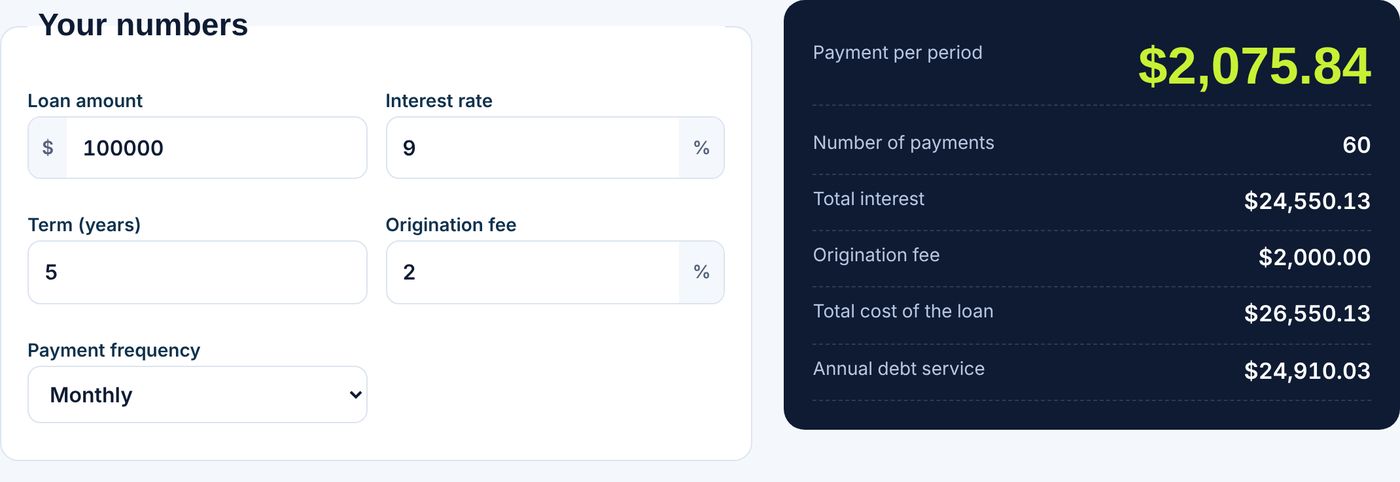
A $100,000 loan at 9% for 5 years, paid monthly, has i = 0.0075 and N = 60. The payment is $2,075.84. Total repaid is $124,550.13, so interest is $24,550.13. A 2% origination fee adds $2,000, making the total cost $26,550.13. Annual debt service is $24,910.03.
With quarterly payments instead, the rate per period is 2.25% and there are 20 payments of $6,264.21. Same loan, different schedule.
Will the business cover the payment?
Lenders compare cash flow with debt payments using the debt service coverage ratio: net operating income divided by annual debt service. If the business earns $150,000 a year before debt payments, then $150,000 / $24,910.03 gives 6.02. Many lenders look for a ratio comfortably above 1. Our DSCR calculator does this check.
Excel formulas
Monthly payment: =PMT(9%/12,60,-100000), which returns $2,075.84. Total interest: =PMT(9%/12,60,-100000)*60-100000. See Microsoft’s PMT function page for options such as payment timing. For interest and principal by month, use our amortization schedule.
SBA and other options
The SBA lists its loan programs on its loans page; terms, fees and eligibility are set by the program and the lender, so confirm current rules there. Our SBA loan calculator models the payment for those loans.
Common mistakes
- Comparing loans by monthly payment alone. A longer term lowers the payment and raises total cost.
- Ignoring the fee. A 2% fee on $100,000 is $2,000, paid on day one or added to the balance.
- Forgetting seasonality. If revenue dips for a few months, size the loan to the slow months.
- Using the wrong period. Weekly or daily payment loans need the rate and N converted to that period.
You can also stress test the numbers: rerun the calculator with a rate one or two points higher, and with revenue 15 percent lower, to see whether the payment still fits. A loan that only works in the best case is too large.
Tips before applying
- Ask for the total cost, not only the rate.
- Check for prepayment penalties and collateral requirements.
- Keep two or three years of financials ready.
- Borrow what the business can repay in a slow month.
Figures are illustrations, not financial advice.
Frequently asked questions
How do I calculate a business loan payment?
Use Payment = L x i / (1 – (1 + i)^-N), or =PMT(rate/periods,total periods,-loan) in Excel.
What is the payment on $100,000 at 9% for 5 years?
$2,075.84 a month, with $24,550.13 in interest.
What is debt service?
The total loan payments due in a year. Lenders compare it with operating income.
Do origination fees add to the cost?
Yes. A 2% fee on $100,000 adds $2,000 to the total cost of the loan.