



An annuity is just equal payments over time. This guide shows how to value one, with a worked example and the matching Excel formulas.
Updated November 2026
What an annuity is
In finance, an annuity is a series of equal payments made at regular intervals. A savings plan that adds $500 a month is an annuity you pay into. A pension or structured settlement that pays you $500 a month is an annuity you receive. The math is the same for both. The investor.gov glossary has a plain-language definition of annuities that also covers insurance products, which add fees and terms this guide does not model.
To skip the math, use the annuity calculator. Below is how the numbers are produced.
Ordinary annuity vs annuity due
An ordinary annuity pays at the end of each period. An annuity due pays at the start, so each payment earns one extra period of interest. That makes the due version worth more: multiply the ordinary result by (1 + i), where i is the rate per period.
Future value formula
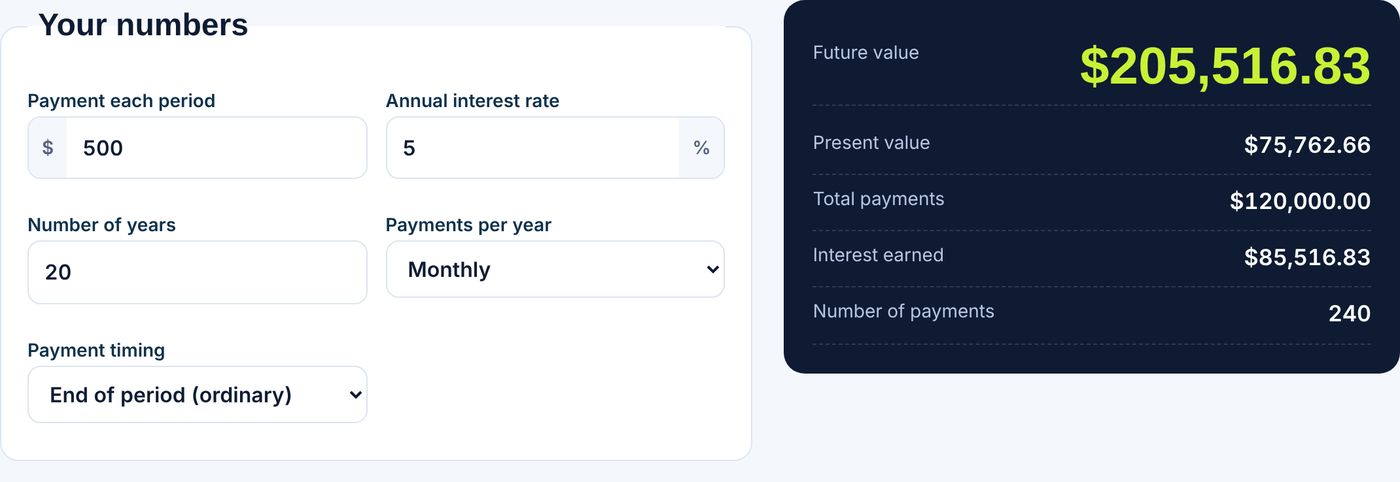
P is the payment, i is the rate per period and N is the number of payments. Take $500 a month at 5% a year for 20 years. Then i = 0.05 / 12 and N = 240. The future value is $205,516.83. Total payments are $500 x 240 = $120,000.00, so interest earned is $85,516.83. If you pay at the start of each month instead, the value rises to $206,373.15.
Present value formula
Present value is what a stream of payments is worth today. Using the same inputs, a $500 monthly payment for 20 years discounted at 5% is worth $75,762.66 today. This is also the lump sum a lender would use to price a loan with that payment. It is the same formula as a loan payment, solved for the loan amount.
Excel formulas
Excel has built-in functions. Microsoft documents the FV function and the PV function. For the example:
=FV(0.05/12,240,-500) returns $205,516.83.
=PV(0.05/12,240,-500) returns $75,762.66.
Payments are entered as negative numbers because they are cash going out. For an annuity due add a final argument: =FV(0.05/12,240,-500,0,1). Check against our compound interest calculator, which handles a lump sum with optional monthly additions.
How to read the result
- Most of the growth comes late. In the example, interest is more than half the final balance.
- Raising the rate by one point or adding five more years changes the result far more than a small payment increase.
- The model assumes a fixed rate. Real investments vary, and insurance annuities charge fees.
Using it for retirement income
To see how much a lump sum could pay out, flip the problem: given a balance and a rate, solve for the payment with =PMT(rate/12,months,-balance). See the 401k savings calculator to estimate the balance first. Figures are illustrations, not advice.
Frequently asked questions
What is the formula for the future value of an annuity?
FV = P x ((1 + i)^N – 1) / i, where P is the payment, i the rate per period and N the number of payments.
What is the difference between ordinary annuity and annuity due?
An ordinary annuity pays at the end of each period and an annuity due pays at the start, so the due version is worth (1 + i) times more.
How do I calculate an annuity in Excel?
Use =FV(rate/12,months,-payment) for future value and =PV(rate/12,months,-payment) for present value.
What is $500 a month for 20 years at 5%?
About $205,516.83 at the end of 20 years, of which $120,000.00 is your own payments.