


Markup and margin are both ways to describe profit, but they use different bases. This guide gives the exact Excel formulas for profit margin, gross margin and markup, with one worked example you can copy.
Updated 25 October 2026. Written by Tahir Abbas, Softotech. All figures are worked examples, not quotes.
Key takeaways
- Margin divides profit by price. Markup divides profit by cost. That is why margin is always the smaller number.
- To hit a target margin, price = cost / (1 – margin), not cost x (1 + margin).
- A 30% margin needs a 42.9% markup, and a 50% markup only delivers a 33.3% margin.
- Discounts cut margin faster than most owners expect: 10% off a 33.3% margin job leaves 25.9%.
- Format percentage cells as Percent, and type 35% or 0.35, never 35.
Profit margin, gross margin and markup in Excel
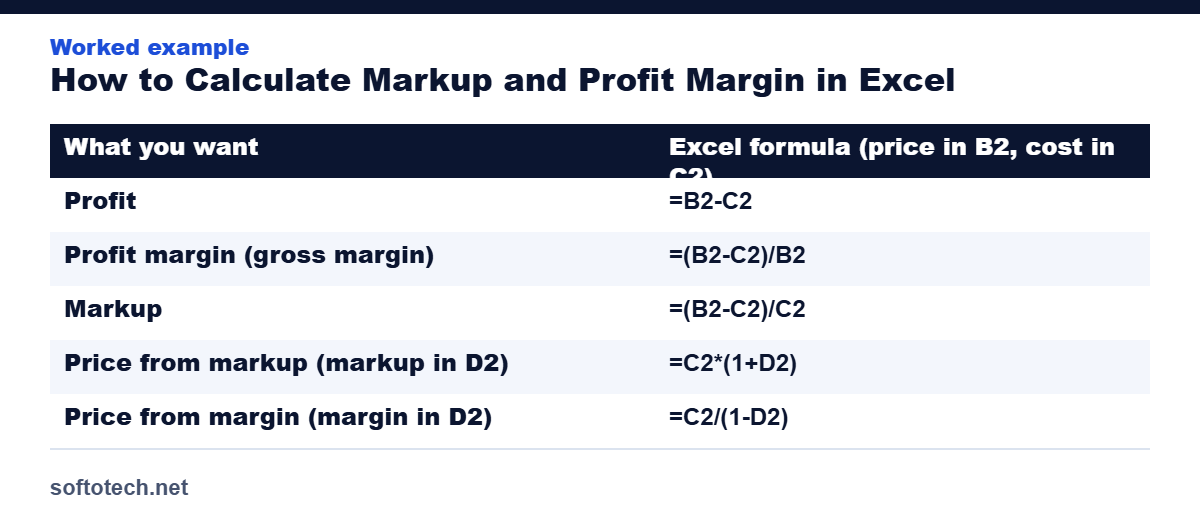
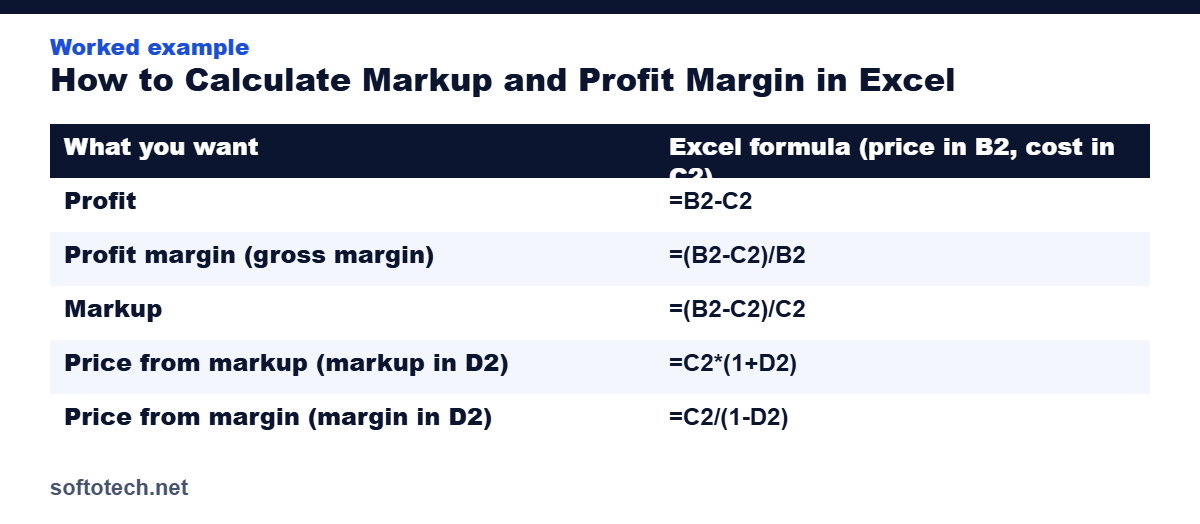
| What you want | Excel formula (price in B2, cost in C2) |
|---|---|
| Profit | =B2-C2 |
| Profit margin (gross margin) | =(B2-C2)/B2 |
| Markup | =(B2-C2)/C2 |
| Price from markup (markup in D2) | =C2*(1+D2) |
| Price from margin (margin in D2) | =C2/(1-D2) |
Format the result cells as a percentage (Home tab, Percent Style) so 0.333 shows as 33.3%.
Worked example
Say a job costs you $40 and you sell it for $60. Put 60 in B2 and 40 in C2.
Margin: =(B2-C2)/B2 gives 33.3%
Markup: =(B2-C2)/C2 gives 50%
The same $20 profit is a 50% markup but only a 33.3% margin. If you want a 40% margin on a $40 cost, the price formula =C2/(1-D2) with D2 = 40% gives $66.67. Using a 40% markup instead would give only $56 and a 28.6% margin.
Gross margin formula in Excel
Gross margin is the margin on revenue after the direct cost of the goods or service. If total revenue is in B2 and cost of goods sold in C2, the formula is the same: =(B2-C2)/B2. Do not include overhead such as rent in the cost; that belongs below gross profit.
Convert between markup and margin
Quotes often start from one number and customers ask for the other. Use these formulas, with the percentage in D2:
| You have | You want | Excel formula |
|---|---|---|
| Markup | Margin | =D2/(1+D2) |
| Margin | Markup | =D2/(1-D2) |
The same conversion for common values:
| Markup | Margin | Margin | Markup | |
|---|---|---|---|---|
| 25% | 20.0% | 20% | 25.0% | |
| 30% | 23.1% | 30% | 42.9% | |
| 40% | 28.6% | 40% | 66.7% | |
| 50% | 33.3% | 50% | 100.0% | |
| 100% | 50.0% | 60% | 150.0% |
A 30% markup is not a 30% margin. If you need a 30% margin, your markup must be 42.9%. We cover this case in detail in markup for 30 percent margin, and the theory behind it in contractor markup vs margin.
Build a price list in Excel
Set up one row per item. Put the cost in column B and your target margin in column C. Then fill the rest with formulas and copy them down:
- Price in D2:
=B2/(1-C2) - Profit in E2:
=D2-B2 - Markup in F2:
=(D2-B2)/B2
| Item | Cost | Target margin | Price | Profit | Markup |
|---|---|---|---|---|---|
| Job A | $40.00 | 35% | $61.54 | $21.54 | 53.8% |
| Job B | $85.00 | 45% | $154.55 | $69.55 | 81.8% |
| Job C | $120.00 | 25% | $160.00 | $40.00 | 33.3% |
Format column C and F as percentages and D and E as currency (Home tab). If you keep the margin in one cell for all rows, lock it with dollar signs, for example =B2/(1-$H$1), so the reference does not move when you copy the formula down.
Common mistakes
- Using a markup percentage as if it were a margin. A 50% markup gives a 33.3% margin, not 50%.
- Dividing profit by the wrong cell. Margin divides by price, markup divides by cost.
- Forgetting that overhead must come out of the margin. Check that your margin covers it with our break-even guide.
- Rounding the price too early. Keep full precision in the cells and round only the final quote.
- Typing 35 instead of 35%. In Excel the cell must hold 0.35 or 35%.
To set the cost side of your price, work out your hourly rate first. For the basic percentage formulas, see Microsoft support on calculating percentages.
Sources and a note
- Microsoft Support: Calculate percentages
- IRS: Publication 334, Tax Guide for Small Business
- IRS: Guide to business expense resources (Publication 535)
Prices, costs and margins are examples. Use your own numbers.
Skip the formulas
To try different markups and margins without building a sheet, use the small business pricing calculator. To price jobs with overhead and labor included, try the contractor bid calculator or the job costing spreadsheet.
What does a discount do to my margin?
Use the worked example: cost $40, price $60, profit $20, margin 33.3%. Give a 10% discount and the price becomes $54. Profit falls to $14 and margin to $14 / $54 = 25.9%. A 10% price cut removed 30% of the profit ($20 to $14).
To earn the same $20 profit at $14 per sale, you need $20 / $14 = 1.43 times as many sales, about 43% more volume. A 20% discount ($48 price, $8 profit) needs 2.5 times the sales. Before you offer a discount, check whether you can really win that extra volume.
In Excel, with price in B2, cost in C2 and discount in D2: new price =B2*(1-D2), new margin =(B2*(1-D2)-C2)/(B2*(1-D2)).
How do I build in card fees or sales commission?
If a fee is a percent of the price, it comes out of your margin. Include it in the price formula: price = cost / (1 – margin – fee rate).
Example: cost $40, target margin 35%, card fee 3%. Price = $40 / (1 – 0.35 – 0.03) = $64.52. The fee is $64.52 x 3% = $1.94. Profit is $64.52 – $40 – $1.94 = $22.58, which is 35.0% of the price.
In Excel, with cost in B2, margin in C2 and fee rate in D2: =B2/(1-C2-D2). Without the fee term the same job would be priced at $61.54 and the real margin would drop to 32.0% after the fee.
How do I find the blended margin across several jobs?
Do not average the margin percentages. Add the revenue and the cost, then divide. Using the price list above:
| Item | Price | Cost | Profit |
|---|---|---|---|
| Job A | $61.54 | $40.00 | $21.54 |
| Job B | $154.55 | $85.00 | $69.55 |
| Job C | $160.00 | $120.00 | $40.00 |
| Total | $376.09 | $245.00 | $131.09 |
Blended margin is $131.09 / $376.09 = 34.9%. Blended markup is $131.09 / $245 = 53.5%. In Excel use =SUM(E2:E4)/SUM(D2:D4) for margin, where D is price and E is profit.
How do I check my Excel formulas?
- Work one row by hand. Cost $40, price $60 must show 33.3% margin and 50% markup.
- Test the reverse. A price from =C2/(1-D2) fed back into =(B2-C2)/B2 should return the margin you typed.
- Wrap divisions to avoid errors on blank rows: =IFERROR((B2-C2)/B2,””).
- Check that the cells hold numbers, not text. Left-aligned figures are often text.
- Keep the margin in one input cell and lock it with dollar signs, as shown above.
Microsoft’s guide to calculating percentages covers the percent formats in more detail.
Which should I use, markup or margin?
Use markup when you price from cost, as many contractors and retailers do. Use margin when you report results, compare to other businesses or check whether overhead is covered, because margin is a share of sales. The two always describe the same profit, so convert with the formulas above rather than mixing them.
Tax treatment of costs, such as what counts as cost of goods sold, has its own rules. Check the current rules in IRS Publication 334 or ask a tax professional.
Frequently asked questions
What is the formula for profit margin in Excel?
If revenue is in B2 and cost in C2, use =(B2-C2)/B2 and format the cell as a percentage.
What is the formula for markup in Excel?
With price in B2 and cost in C2, use =(B2-C2)/C2 and format as a percentage.
How do I calculate price from a target margin in Excel?
With cost in C2 and margin in D2, use =C2/(1-D2).
Why is margin always lower than markup?
Margin divides profit by the price, markup divides it by the cost. Price is larger than cost, so margin is smaller.
How do I calculate a 30% margin in Excel?
With cost in C2, use =C2/(1-0.3) to get the price. A $40 cost gives $57.14. That is a 42.9% markup. Check it with =(B2-C2)/B2, which returns 30%.
Is a 50% markup the same as a 50% margin?
No. A 50% markup on a $40 cost gives a $60 price and a 33.3% margin. A 50% margin needs a 100% markup, so the price would be $80.
How do I show margin as a percentage in Excel?
Enter the formula, for example =(B2-C2)/B2. Then select the cell and click Percent Style on the Home tab. The cell must hold a decimal such as 0.333 to display 33.3%.
Related guides: How to price baked goods · How to calculate your break-even point · How to calculate your hourly rate