

Updated October 2026 · 6 minute read
Every business already owns the data it needs. It sits in spreadsheets nobody opens twice, because a wall of rows answers nothing. This guide turns that raw material into a small dashboard that answers the questions you actually ask every week, in five steps.
- A spreadsheet becomes strategy when it answers questions, not when it stores rows. Start from 3 to 5 questions, not from the data you happen to have.
- The build order matters: clean data first, KPIs second, charts third, automated refresh last.
- One screen, headline numbers at the top, one accent colour, and a one line insight under every chart.
- Know the limit: when data changes hourly or dozens of people edit at once, a spreadsheet is the wrong home and a BI tool earns its cost.
Why raw spreadsheets never get used
Most reporting dies in the same three ways. First, the file stores everything and answers nothing, so opening it means starting an investigation, not reading an answer. Second, every department keeps its own copy, so the same number appears in three versions and meetings argue about whose file is right. Third, the report depends on one person rebuilding it by hand each month, so it arrives late, or not at all when that person is away.
A dashboard fixes all three at once: one source of truth, one screen, refreshed on a routine. The spreadsheet does not disappear. It moves underneath, where it belongs, and the dashboard becomes the only thing people open.
Step 1: Start from questions, not data
Write down the questions the business asks every week, in the words people actually use. For a typical small business they sound like this:
- Are sales up or down against last month, and against last year?
- Which service or product line makes the money, and which one eats it?
- Where do costs keep creeping up?
- How many enquiries came in, and how many turned into paying work?
Three to five questions are enough. Every chart and number on the finished dashboard must trace back to one of them. If a metric answers no question, it does not get a chart, however interesting it looks.
Step 2: Clean and structure the data
No chart survives dirty data. Before any design work: one row per record, one format per column, duplicates merged, and the raw data kept in its own table that formulas read from, never typed over. If the source data is a CRM export, this is the same cleanup sequence from our guide to going from data chaos to clean leads: audit, dedupe, standardize, then build.
Keep three layers separate from here on: the raw data, the calculations, and the dashboard itself. Mixing them is how dashboards break the first time someone sorts a column.
Step 3: Pick a few KPIs and the right chart for each
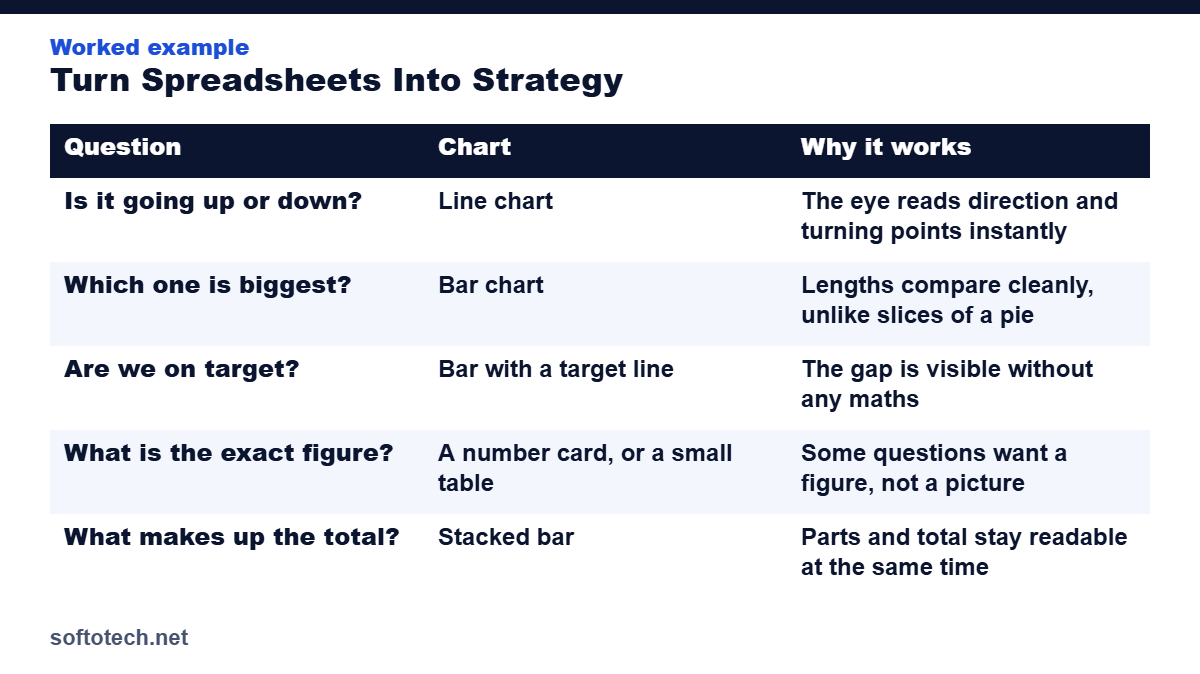
Each question gets one KPI and the chart shape that answers it fastest:
| Question | Chart | Why it works |
|---|---|---|
| Is it going up or down? | Line chart | The eye reads direction and turning points instantly |
| Which one is biggest? | Bar chart | Lengths compare cleanly, unlike slices of a pie |
| Are we on target? | Bar with a target line | The gap is visible without any maths |
| What is the exact figure? | A number card, or a small table | Some questions want a figure, not a picture |
| What makes up the total? | Stacked bar | Parts and total stay readable at the same time |
Notice the pie chart is missing. Pies make people guess at angles, and business questions are rarely about angles. Three to five headline KPIs are the ceiling. Past that, nothing on the screen is a priority.
Step 4: Lay out one screen people actually read
Put the headline numbers at the top left, where eyes land first. Trends in the middle, detail tables at the bottom for the people who want to dig. Use one accent colour for the numbers that matter and grey for everything else, so colour itself carries meaning.
Add simple filters if the business has real segments, by service, location or rep. One click filters beat five copies of the same dashboard.
Step 5: Automate the refresh
The dashboard that needs an hour of copy and paste every Monday is a dashboard that gets skipped by the third Monday. Build the refresh in from the start: formulas that read the data table directly, imports that land in the same place every time, and a short written routine for whoever updates the raw numbers. Then protect the dashboard sheet so viewers can look and filter, but not edit the machinery.
Picture a cleaning company running this way. Jobs per week, revenue per job and repeat booking rate sit at the top. One line underneath says which number moved and why. The owner reads it in a minute on Monday morning, and the month end scramble is gone, because the numbers were never allowed to pile up.
When a spreadsheet is not enough
Honesty saves money here. A spreadsheet dashboard is the right tool for weekly and monthly reporting in most small businesses. It is the wrong tool when data changes by the hour, when dozens of people need to edit at once, or when the data runs to hundreds of thousands of rows that slow every refresh. At that point a dedicated BI tool earns its cost, and the same five steps still apply inside it: questions, clean data, KPIs, layout, refresh.
How we build dashboards at Softotech
Dashboard and reporting builds are a regular part of our Excel and automation work. We start from your questions, clean the data underneath, and hand over a one screen dashboard in Excel or Google Sheets with the refresh routine written down, so your team can run it without us. Our free calculators on this site are built the same way: one question, one clean answer, nothing extra.
It is the same discipline behind our 6,000 plus projects over more than ten years, from lead lists that update weekly to the reporting packs owners open every Monday.
Turn your spreadsheets into a dashboard
Tell us the questions you ask every week. We will build the dashboard that answers them, with the refresh automated and the routine documented.
Questions
What is the difference between a spreadsheet and a dashboard?
A spreadsheet stores and calculates rows of data. A dashboard is a one screen view built on top of that data, designed to answer specific questions at a glance. You need the first to build the second.
How many KPIs should a dashboard have?
Three to five headline numbers. More than that and nothing reads as a priority. The detail belongs in the tables underneath, one click away, not on the main screen.
Which charts should I use in a business dashboard?
A line chart for trends over time, bars for comparing categories, a bar with a target line for progress, and number cards or small tables for exact figures. Pie charts rarely answer a business question well.
Can Excel or Google Sheets really run a business dashboard?
Yes, for the weekly and monthly reporting most small businesses need. When data changes hourly, or many people edit at the same time, a dedicated BI tool becomes the better home for the same dashboard.
Related guides
Sources
- DashboardsExcel: Creating effective Excel dashboards, best practices, accessed October 2026
- Infograph: Excel dashboard tutorial, from spreadsheet to visual report, accessed October 2026
Tahir Abbas
Founder of Softotech Solutions. Tahir’s team builds dashboards and reporting systems in Excel and Google Sheets for agencies and small businesses, as part of its automation work. The five steps in this guide are the same ones his team follows on client builds.